IDS vs. IPS: A Common Cybersecurity Interview Question
“What’s the difference between IDS and IPS?” Here's a breakdown of the key facts about IDS and IPS that I find helpful when answering this question.

If you’re aiming for a cybersecurity job—or any IT role—you’ve likely encountered this classic interview question: “What’s the difference between IDS and IPS?” Both systems are essential for analyzing network traffic, but they function in distinct ways. Here's a breakdown of the key facts about IDS and IPS that I find helpful when answering this question.
Detection/Prevention Techniques
IDS and IPS rely on three core techniques for detecting and preventing threats:
- Signature-Based: Uses predefined rules to detect known malicious patterns.
- Behavior-Based: Compares normal behavior to unknown or abnormal patterns to detect previously unknown or new threats
- Policy-Based: Ensures activities adhere to system configuration and security policies, helping to detect policy violations.
Intrusion Detection System (IDS)
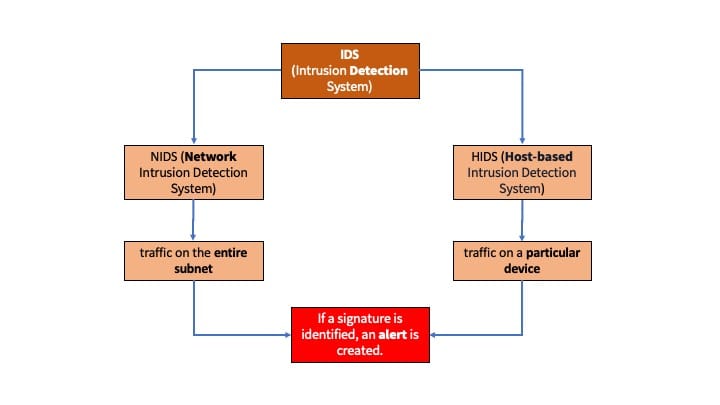
IDS is a passive monitoring solution used to detect potential malicious activities, abnormal incidents, or policy violations. Its primary function is to generate alerts for each suspicious event it encounters. There are two main types of IDS systems: NIDS and HIDS.
Examples:
- Detecting unauthorized devices connected to the local network
- Alerting when unauthorized users access a system or modify files
Network Intrusion Detection System (NIDS)
NIDS monitors traffic across various network segments, investigating the entire subnet. If a suspicious pattern matches a known signature, an alert is triggered.
Example:
NIDS examines network traffic patterns to detect intrusions across the entire network.
Host-based Intrusion Detection System (HIDS)
HIDS, on the other hand, monitors traffic on single endpoint devices. The aim is to investigate the traffic on a particular device. If a suspicious pattern matches a known signature, an alert is triggered.
Example:
HIDS analyzes system calls, file-system changes, and other system activities.
Intrusion Prevention System (IPS)
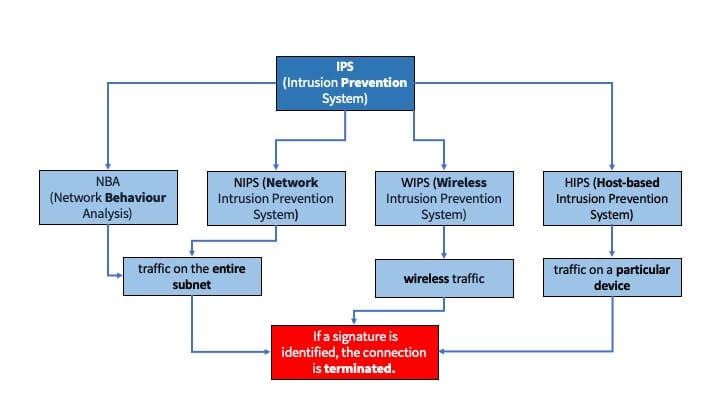
IPS is an active defense solution that goes a step further by preventing malicious activities in real-time. It doesn't just detect threats; it blocks or mitigates them as soon as they’re identified. IPS comes in four main types: NIPS, NBA, WIPS, and HIPS.
Example:
- Proactively stopping intrusion attempts
- Blocking potential threats before they reach their target, often deployed in front of critical assets.
Network Intrusion Prevention System (NIPS)
NIPS monitors network traffic to detect and prevent attacks. Unlike NIDS, it actively terminates suspicious connections once a signature is detected.
Example:
- NIPS monitors all network traffic, allowing or disallowing passage based on the rules.
- To be effective, NIPS must be deployed inline so that all traffic flows through it.
Behavior-based Intrusion Prevention System (known as NBA)
NBA (Network Behaviour Analysis) focuses on identifying abnormal network behaviors rather than just signature-based threats. These systems require a learning or baselining period to understand normal traffic and differentiate it from malicious traffic. It also actively terminates suspicious connections once a signature is detected.
Example:
NBA systems can detect unusual traffic patterns such as Distributed Denial of Service (DDoS) attacks or other policy violations by monitoring traffic behaviors.
Wireless Intrusion Prevention System (WIPS)
WIPS specifically secures wireless traffic. It terminates connections if a signature is matched, offering protection against attacks targeting wireless networks.
Example:
WIPS analyzes the radio spectrum to detect unauthorized access or policy violations in wireless environments.
Host-based Intrusion Prevention System (HIPS)
HIPS safeguards single endpoint devices like workstations and servers. It monitors local traffic and activities, blocking suspicious behavior based on pre-configured rules.
Example:
HIPS monitors data access requests, file modifications, and network connections to determine whether to allow or block them.
A Quick Recap
To wrap up all this information:
- IDS is designed to detect threats and alert users but requires manual intervention to stop them. Think "D" for Detection!
- IPS not only detects threats but also takes action to block them immediately, minimizing the need for user input. Think "P" for Prevention!