How Does Email Delivery Work? (Simplified)
Here's a simple explanation to help you understand how an email reaches its recipient.
The process of sending an email involves a lot of complexity when you consider every technical detail, including the protocols and their specific network-related tasks. Protocols are essential because they standardize these processes, allowing computers and servers to communicate, regardless of the underlying hardware or software.
If you're not an experienced email server administrator, all this information can be overwhelming. But don't worry—here's a simple explanation to help you understand how an email reaches its recipient.
You only need to remember three key protocols that handle outgoing and incoming email messages.
SMTP (Simple Mail Transfer Protocol): Delivering Emails
- SMTP is the technical standard for sending emails over a network.
- It’s the protocol used to transmit the email to a SMTP server.
- Key point: SMTP is for mail delivery, not mail retrieval.
POP3 and IMAP: Retrieving Emails
To retrieve an email from a mail server, we use either POP3 or IMAP. However, these two protocols work quite differently.
POP3 (Post Office Protocol)
- Emails and sent messages are stored on a single device.
- Once the email is downloaded, it’s deleted from the server, so it cannot be accessed from another device.
- Key point: Emails are only accessible from a single device.
IMAP (Internet Message Access Protocol)
- Emails remain on the server and can be downloaded to multiple devices.
- Sent messages are also stored on the server.
- Key point: Emails can be accessed from multiple devices.
A Simplified Example
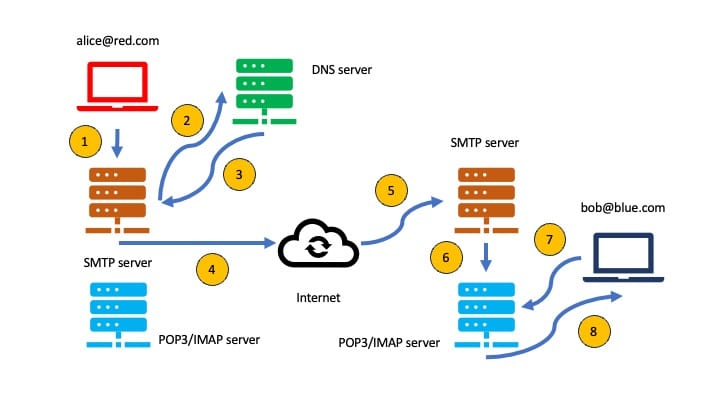
Let’s break it down with an example:
Step 1
Alice writes an email to Bob using her email client and clicks "send."
Step 2
The SMTP server needs to figure out where to deliver Alice's email. It queries DNS (Domain Name System) for the necessary details about Bob's domain, blue.com.
Step 3
The DNS server provides the relevant information about blue.com to Alice's SMTP server.
Step 4
Alice's SMTP server then sends the email through the internet to Bob's mailbox at blue.com.
Step 5
The email travels through multiple SMTP servers until it reaches the destination server for blue.com.
Step 6
Once at the destination, Alice's email is forwarded to the local POP3/IMAP server and waits for Bob to retrieve it.
Step 7
Bob logs into his email client, which queries the local POP3/IMAP server to check for new messages in his mailbox.
Step 8
The email is then either copied using IMAP or downloaded using POP3 to Bob’s email client, allowing him to finally read it.